Ubuntu 换源:deb822 格式与国内镜像
从 24.04 开始,Ubuntu 的软件源不再写在 /etc/apt/sources.list,而是换成了 /etc/apt/sources.list.d/ubuntu.sources 这个 deb822 格式的文件。网上很多「换源教程」还在教你改 sources.list,照着做在 26.04 上不会生效。
先看看现在的源文件
head -12 /etc/apt/sources.list.d/ubuntu.sources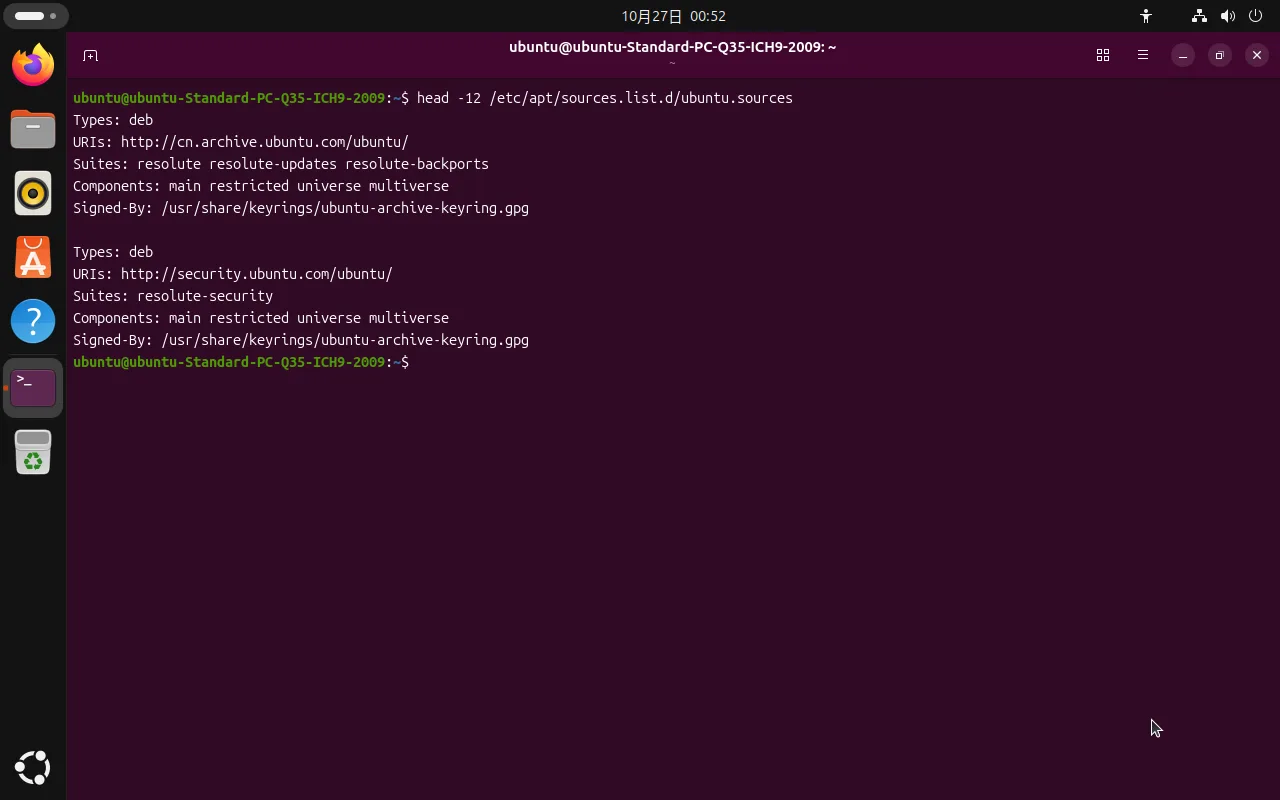
在 26.04 上你会看到这样的内容(两段,主仓库 + 安全更新):
Types: deb
URIs: http://cn.archive.ubuntu.com/ubuntu/
Suites: resolute resolute-updates resolute-backports
Components: main restricted universe multiverse
Signed-By: /usr/share/keyrings/ubuntu-archive-keyring.gpg

Types: deb
URIs: http://security.ubuntu.com/ubuntu/
Suites: resolute-security
Components: main restricted universe multiverse
Signed-By: /usr/share/keyrings/ubuntu-archive-keyring.gpg
几个字段的含义:
| 字段 | 含义 |
|---|---|
Types | 仓库类型,deb 是二进制包(源码包是 deb-src) |
URIs | 要换的就是这一行——镜像站地址 |
Suites | 发行版代号:resolute 是 26.04,加 -updates/-security/-backports 是各自通道 |
Components | 软件分类,main restricted universe multiverse |
Signed-By | 校验签名用的密钥,不要动 |
26.04 默认就指向 cn.archive.ubuntu.com,也就是说国内用户开箱就在用镜像。换成阿里云、清华这些是为了更稳更快(官方国内镜像有时会慢或同步延迟),不是「不换就用不了」。
换源:只改 URIs
关键原则:只动 URIs,Suites 和 Signed-By 一个字都别改。代号写错会直接 404。
先备份:
sudo cp /etc/apt/sources.list.d/ubuntu.sources /etc/apt/sources.list.d/ubuntu.sources.bak再替换(以阿里云为例):
sudo sed -i -E 's|(cn\.)?archive\.ubuntu\.com|mirrors.aliyun.com|g; s|security\.ubuntu\.com|mirrors.aliyun.com|g' \
  /etc/apt/sources.list.d/ubuntu.sources
验证:
sudo apt update看到 Hit/Get 从新域名返回、没有 404 或 Release file 报错,就成功了。
常用镜像站
把上面命令里的 mirrors.aliyun.com 换成下表任意一个即可:
| 镜像站 | 域名 |
|---|---|
| 阿里云 | mirrors.aliyun.com |
| 清华大学 | mirrors.tuna.tsinghua.edu.cn |
| 中科大 | mirrors.ustc.edu.cn |
| 华为云 | mirrors.huaweicloud.com |
出问题了怎么回滚
换完 apt update 报错,一条命令退回原状:
sudo cp /etc/apt/sources.list.d/ubuntu.sources.bak /etc/apt/sources.list.d/ubuntu.sources
sudo apt update
所以备份那一步别省。
图形界面还能换源吗
26.04 默认集合里没有「软件和更新」(software-properties-gtk)。在应用搜索里输入 software,打开的是应用中心(App Center),它只能装 Snap,改不了 apt 源。
所以「设置里点几下换源」的流程在 26.04 上走不通,要么用上面的命令行,要么用下面这条安装老界面的命令(如果你确实想要图形界面):
sudo apt install software-properties-gtkPPA 和镜像不是一回事
换源只影响 Ubuntu 官方仓库。你手动添加的 PPA(add-apt-repository ppa:xxx/yyy)写在 /etc/apt/sources.list.d/ 下各自的 .list 或 .sources 文件里,不会跟着换源命令走,仍然是直连 launchpad。
如果 PPA 在国内很慢,只能自己找对应项目的国内镜像,或者用代理。
常见报错
404 Not Found 或 Release file ... does not have a Release file
Suites 里的代号写错或镜像站还没同步这个代号。26.04 是 resolute,不是 noble(24.04)也不是 plucky(25.04)。
NO_PUBKEY 或 The following signatures couldn't be verified
跟换源无关,是 PPA 的 GPG 公钥缺失。按报错里给出的 key id 导入:
sudo apt-key adv --keyserver keyserver.ubuntu.com --recv-keys <KEY_ID>更规范的做法是把密钥存到 /usr/share/keyrings/ 再用 Signed-By 引用,apt-key 在新版本里已标记为废弃。
Release file for ... is not valid yet
本机时间不准。用 timedatectl 看一眼,必要时开启时间同步:
sudo timedatectl set-ntp true