Switching to a Mirror: deb822 and apt Sources
Since 24.04 the Ubuntu package sources no longer live in /etc/apt/sources.list; they moved to /etc/apt/sources.list.d/ubuntu.sources in the deb822 format. Plenty of guides still tell you to edit sources.list, and on 26.04 that simply does nothing.
Look at the file first
head -12 /etc/apt/sources.list.d/ubuntu.sources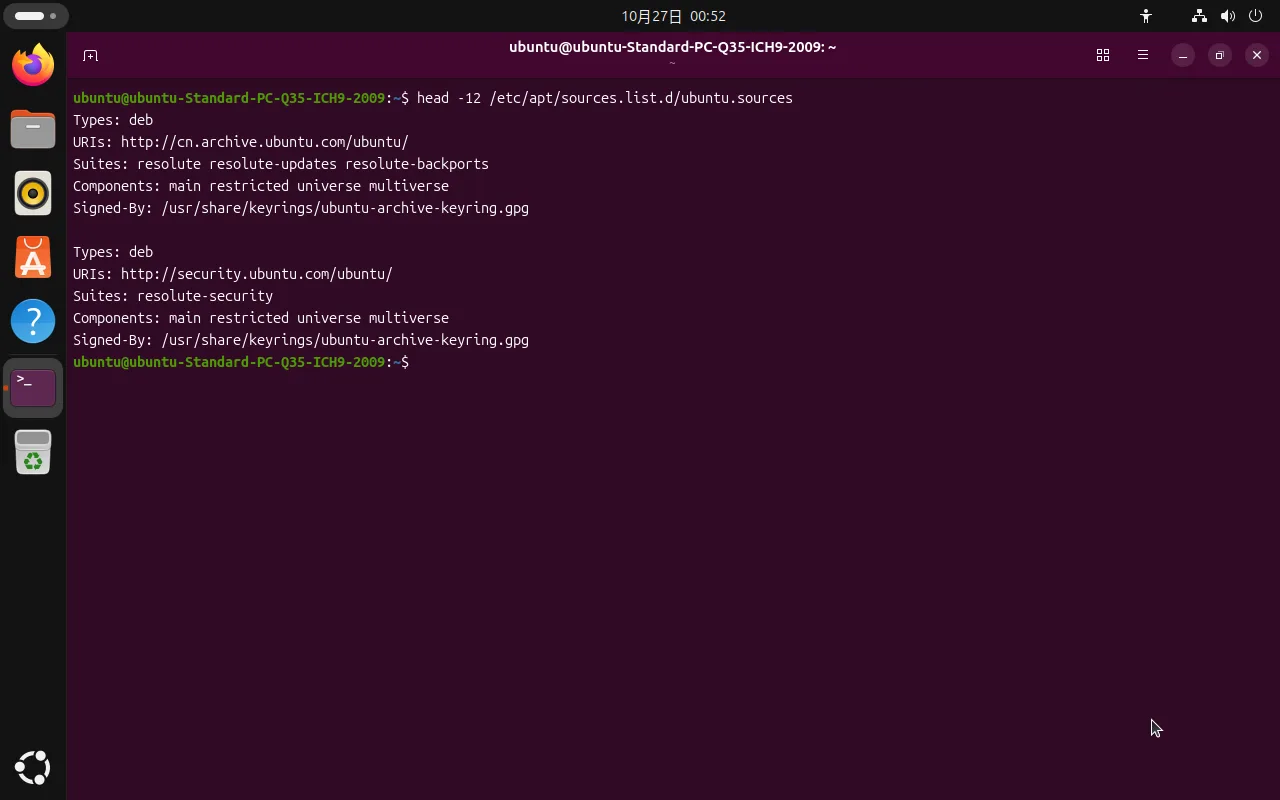
On 26.04 it looks like this — two stanzas, the main archive and the security channel:
Types: deb
URIs: http://cn.archive.ubuntu.com/ubuntu/
Suites: resolute resolute-updates resolute-backports
Components: main restricted universe multiverse
Signed-By: /usr/share/keyrings/ubuntu-archive-keyring.gpg

Types: deb
URIs: http://security.ubuntu.com/ubuntu/
Suites: resolute-security
Components: main restricted universe multiverse
Signed-By: /usr/share/keyrings/ubuntu-archive-keyring.gpg
What the fields mean:
| Field | Meaning |
|---|---|
Types | Repository kind; deb is binary packages (deb-src is source) |
URIs | The line you change — the mirror address |
Suites | Release codename: resolute is 26.04; -updates, -security and -backports are the channels |
Components | Package sections: main restricted universe multiverse |
Signed-By | Verification key — leave it alone |
26.04 already points at cn.archive.ubuntu.com, so Chinese users start on a mirror. Switching to Aliyun or TUNA is about speed and reliability (the official China mirror can lag), not about making apt work at all.
Changing the mirror: URIs only
The rule: touch URIs only. A wrong codename in Suites and you get 404s.
Back up first:
sudo cp /etc/apt/sources.list.d/ubuntu.sources /etc/apt/sources.list.d/ubuntu.sources.bakThen replace (Aliyun here):
sudo sed -i -E 's|(cn\.)?archive\.ubuntu\.com|mirrors.aliyun.com|g; s|security\.ubuntu\.com|mirrors.aliyun.com|g' \
  /etc/apt/sources.list.d/ubuntu.sources
Verify:
sudo apt updateIf the Hit/Get lines come back from the new host without 404 or Release file errors, you are done.
Common mirrors
Swap mirrors.aliyun.com in the command above for any of these:
| Mirror | Host |
|---|---|
| Aliyun | mirrors.aliyun.com |
| Tsinghua TUNA | mirrors.tuna.tsinghua.edu.cn |
| USTC | mirrors.ustc.edu.cn |
| Huawei Cloud | mirrors.huaweicloud.com |
Rolling back
If apt update fails after the change, one command restores the original:
sudo cp /etc/apt/sources.list.d/ubuntu.sources.bak /etc/apt/sources.list.d/ubuntu.sources
sudo apt update
That is why the backup step is not optional.
Is there still a GUI for this?
Not in the default set. 26.04 does not ship Software & Updates (software-properties-gtk); searching for “software” opens the App Center, which only handles Snaps and cannot edit apt sources.
So the click-through workflow no longer exists on 26.04. Use the commands above, or install the old panel if you really want it:
sudo apt install software-properties-gtkPPAs are not mirrors
Changing the mirror only affects the official Ubuntu archive. PPAs you added with add-apt-repository ppa:xxx/yyy live in their own .list or .sources files under /etc/apt/sources.list.d/ and keep connecting to launchpad directly.
If a PPA is slow from your network, the only options are a project-specific mirror or a proxy.
Common errors
404 Not Found or “does not have a Release file”
The codename in Suites is wrong, or the mirror has not synced that release yet. 26.04 is resolute — not noble (24.04) and not plucky (25.04).
NO_PUBKEY or “signatures couldn’t be verified”
Unrelated to the mirror: a PPA key is missing. Import the id from the error message:
sudo apt-key adv --keyserver keyserver.ubuntu.com --recv-keys <KEY_ID>The cleaner approach is storing the key under /usr/share/keyrings/ and referencing it with Signed-By; apt-key is deprecated in current releases.
“Release file … is not valid yet”
The system clock is off. Check timedatectl and enable time sync:
sudo timedatectl set-ntp trueRelated
- Post-install setup for China — language packs, input method, fonts, timezone
- Sources and updates — repository structure, pinning and holding versions
- APT command reference — the apt subcommands you use day to day